

smellycat
solidworks草圖中如何使用移動(dòng)、復(fù)制、旋轉(zhuǎn)、按比例縮放和伸展實(shí)體已關(guān)閉評論

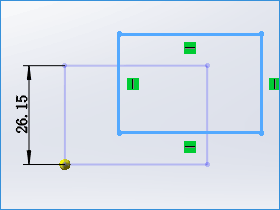
在繪制solidworks草圖的時(shí)候,如何有相同的結(jié)構(gòu),親完全可以通過復(fù)制來節(jié)省時(shí)間,也可按比例縮放,在autocad中實(shí)現(xiàn)的功能,在SW草圖中也可以。下面的solidworks教程主要就介紹一下草圖中的這幾個(gè)工具的使用。文章源自solidworks教程網(wǎng)-http://m.66kg.cn/1683.html
- 移動(dòng)和復(fù)制操作不生成幾何關(guān)系。若想生成幾何關(guān)系,您必須添加幾何關(guān)系。??
| 移動(dòng)草圖繪制實(shí)體 | |
| 復(fù)制草圖繪制實(shí)體 | |
| 旋轉(zhuǎn)草圖繪制實(shí)體 | |
| 按比例縮放的草圖繪制實(shí)體 | 復(fù)制 已清除: |
|
復(fù)制 已選擇且 份數(shù) 被設(shè)置為 1: |
總結(jié):都是簡單實(shí)用的工具,自己在solidworks草圖中實(shí)際畫一畫,試一試。文章源自solidworks教程網(wǎng)-http://m.66kg.cn/1683.html
文章源自solidworks教程網(wǎng)-http://m.66kg.cn/1683.html文章源自solidworks教程網(wǎng)-http://m.66kg.cn/1683.html