


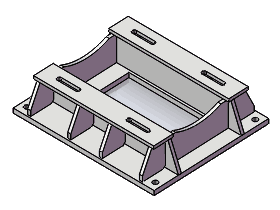
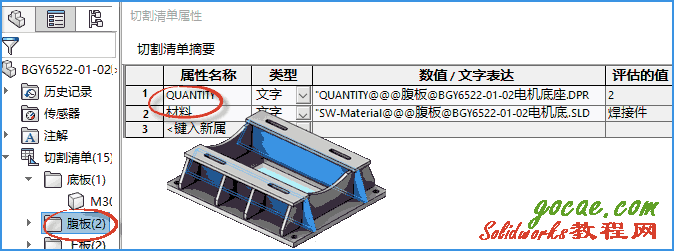
solidworks中如果焊件的零件不是由“結(jié)構(gòu)構(gòu)件”生成的話(huà),切割清單項(xiàng)目的屬性默認(rèn)情況下會(huì)生成“材料”和“數(shù)量”2個(gè)屬性。文章源自solidworks教程網(wǎng)-http://m.66kg.cn/1507.html
- 以下方法的測(cè)試版本solidworks2016
 文章源自solidworks教程網(wǎng)-http://m.66kg.cn/1507.html
今天我會(huì)用“宏”來(lái)自動(dòng)的給切割清單中的零件添加“單重”和“總重”,并自動(dòng)鏈接到工程圖中,這在實(shí)際工作中是非常有用的,比如零件好幾百的板料的焊件,下料的尺寸、數(shù)量和重量統(tǒng)計(jì)。如果人工智能來(lái)做的話(huà),不僅容易出錯(cuò),工作也很繁瑣。文章源自solidworks教程網(wǎng)-http://m.66kg.cn/1507.html
對(duì)于先前說(shuō)的如何出下料的尺寸圖,親們可以以參考這篇文章《工程圖中相對(duì)視圖在solidworks多實(shí)體焊件零件中的應(yīng)用》把把有的下料圖鏈接到同一張圖紙上。文章源自solidworks教程網(wǎng)-http://m.66kg.cn/1507.html
今天我就給親講一下如何把數(shù)量和重重鏈接到solidworks工程圖的“焊接清單明細(xì)表”中。文章源自solidworks教程網(wǎng)-http://m.66kg.cn/1507.html
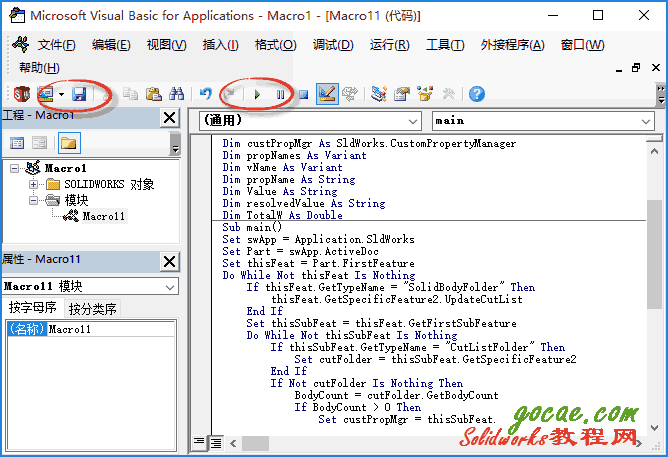
1.運(yùn)行宏,生成單重和總重
1.1宏代碼
Option Explicit
Dim swApp As SldWorks.SldWorks
Dim Part As SldWorks.ModelDoc2
Dim thisFeat As SldWorks.Feature
Dim thisSubFeat As SldWorks.Feature
Dim cutFolder As Object
Dim BodyCount As Integer
Dim fn As String
Dim pn As String
Dim custPropMgr As SldWorks.CustomPropertyManager
Dim propNames As Variant
Dim vName As Variant
Dim propName As String
Dim Value As String
Dim resolvedValue As String
Dim TotalW As Double
Sub main()
Set swApp = Application.SldWorks
Set Part = swApp.ActiveDoc
Set thisFeat = Part.FirstFeature
Do While Not thisFeat Is Nothing
    If thisFeat.GetTypeName = "SolidBodyFolder" Then
        thisFeat.GetSpecificFeature2.UpdateCutList
    End If
    Set thisSubFeat = thisFeat.GetFirstSubFeature
    Do While Not thisSubFeat Is Nothing
        If thisSubFeat.GetTypeName = "CutListFolder" Then
            Set cutFolder = thisSubFeat.GetSpecificFeature2
        End If
        If Not cutFolder Is Nothing Then
            BodyCount = cutFolder.GetBodyCount
            If BodyCount > 0 Then
                Set custPropMgr = thisSubFeat.CustomPropertyManager
                If Not custPropMgr Is Nothing Then
                    custPropMgr.Delete "Total Weight"
                    custPropMgr.Delete "Weight"
                    fn = thisSubFeat.Name
                    pn = Part.GetTitle
                    custPropMgr.Add "Weight", "文字", Chr(34) & "SW-Mass@@@" & fn & "@" & pn & Chr(34)
                    propNames = custPropMgr.GetNames
                    If Not IsEmpty(propNames) Then
                        For Each vName In propNames
                            propName = vName
                            custPropMgr.Get2 propName, Value, resolvedValue
                            If propName = "Weight" Then TotalW = resolvedValue
                        Next vName
                    End If
                    custPropMgr.Add "Total Weight", "文字", Format(BodyCount * TotalW, "0.00")
                End If
            End If
        End If
        Set thisSubFeat = thisSubFeat.GetNextSubFeature
    Loop
    Set thisFeat = thisFeat.GetNextFeature
Loop
End Sub
文章源自solidworks教程網(wǎng)-http://m.66kg.cn/1507.html
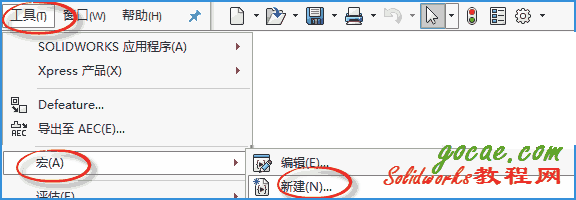
1.2新建宏
 文章源自solidworks教程網(wǎng)-http://m.66kg.cn/1507.html
1.3運(yùn)行宏后添加單重和總重屬性
 文章源自solidworks教程網(wǎng)-http://m.66kg.cn/1507.html
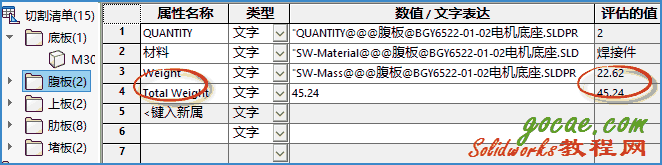 文章源自solidworks教程網(wǎng)-http://m.66kg.cn/1507.html
2.在工程圖的焊接清單中添加單重和總重
2.1添加單重
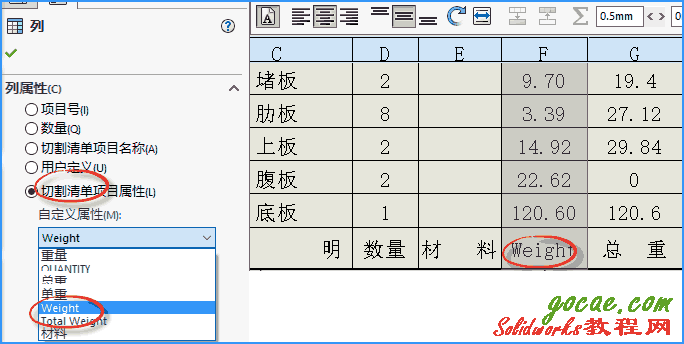 文章源自solidworks教程網(wǎng)-http://m.66kg.cn/1507.html
2.2添加總重
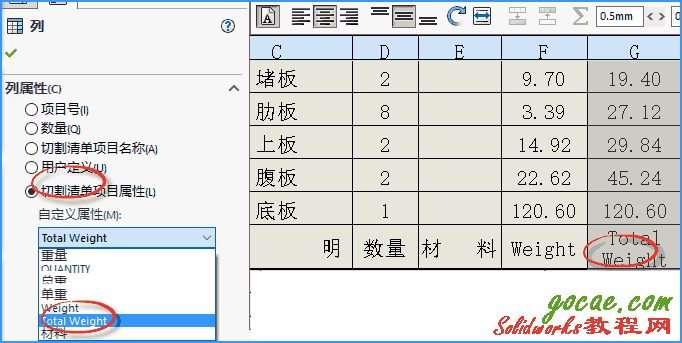
1F
登錄回復(fù)
這個(gè)功能介紹怎么不全?
B1
登錄回復(fù)
在哪方面不全呢?我看了一下還好啊